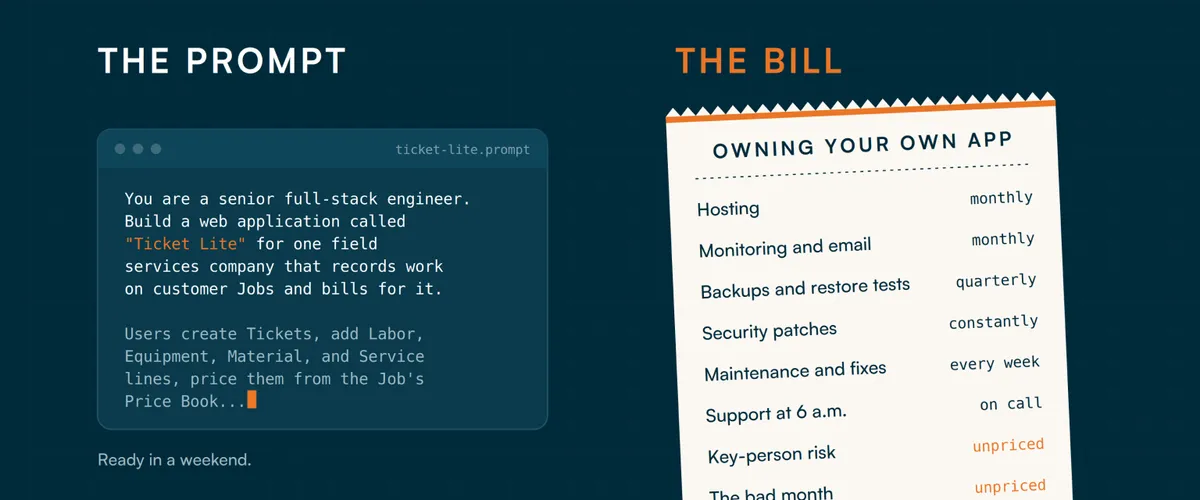
Yes, You Can Vibe-Code Your Own Field Ticketing Software. Here's the Prompt. Here's the Bill.
You can build this. We’ll show you how.
Companies in the field industries have started building their own ticketing and invoicing tools with AI, and we think that’s a reasonable thing to try. The core of a field ticket system is not secret: tickets, labor, equipment, materials, rates, invoices. A good AI coding tool can produce a working version in a weekend.
So instead of pretending otherwise, we’re handing you a prompt. It describes a small application, which we’ll call Ticket Lite (a name for the app you’ll build, not one of our products), that follows the same basic path as Aimsio: create a job, record the work, price it, approve it, and prepare the billing data for an invoice. It’s ready to paste into Claude, Codex, Lovable, Cursor or whatever you use. It covers a slice of the workflow, not the full Aimsio Lite product (our entry-level plan with tickets, invoicing and client approvals, and no cap on users or Jobs).
Then we’ll walk through what happens in month three, month twelve and month thirty-six, because that is where the price tag of a software product actually lives. Writing the first version is the cheap part. Everything after it is the expensive part, and it never stops.
If you read all of this and decide to build, we genuinely hope it goes well. If you decide the math doesn’t work, we’ll be here.
Start with the relationships
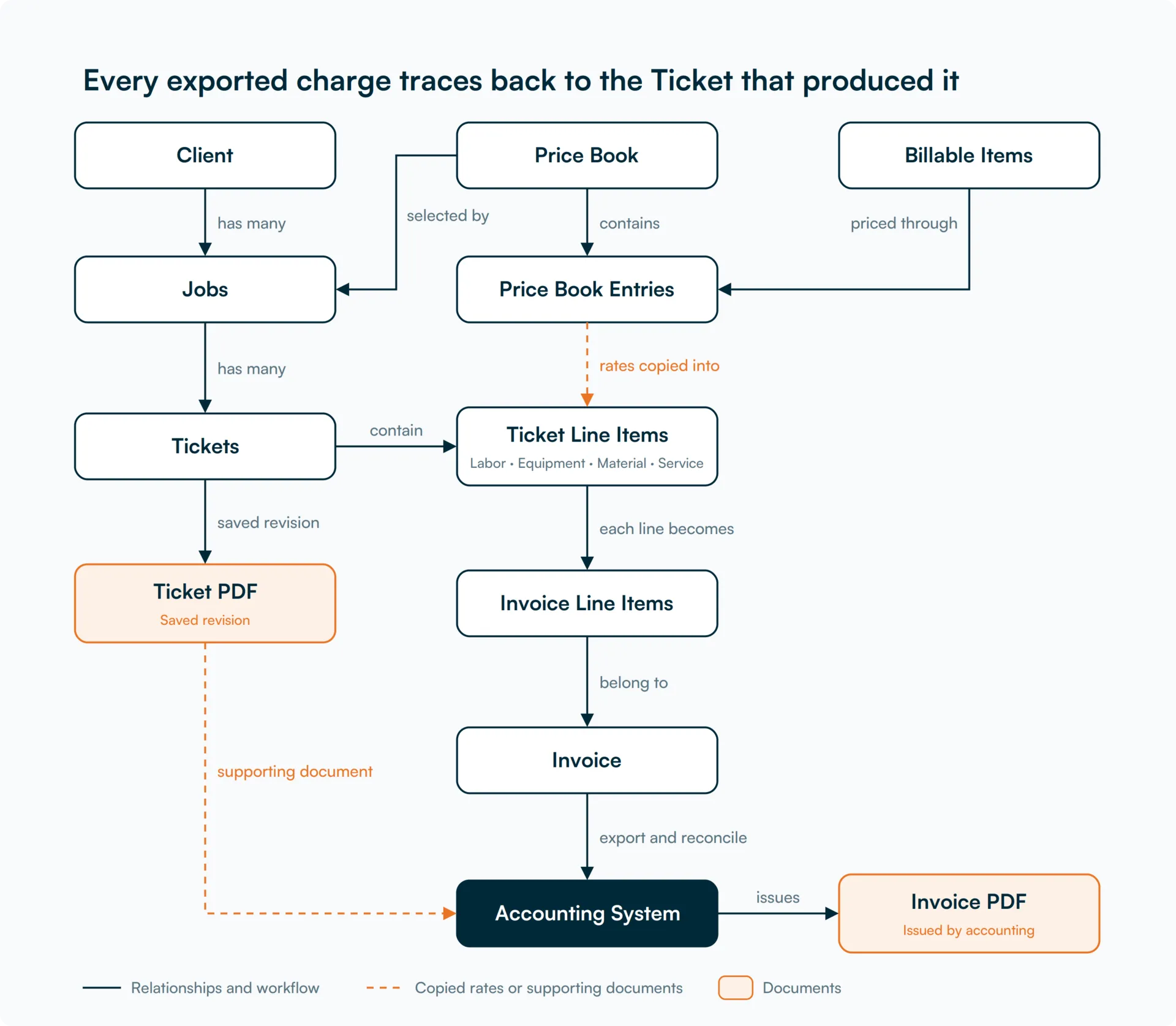
The relationships matter more than the screens. A Client has Jobs. Each Job selects a Price Book. A Billable Item describes what you sell, and a Price Book Entry says what you charge for it under that book. A Ticket records work on a Job through Labor, Equipment, Material and Service lines. Approved work is grouped for invoicing, and the field system can export that billing data so your accounting system produces the final invoice.
The same “Foreman” item can appear in several Price Books at different rates, and the Job decides which book applies. Once a rate is applied to a Ticket you have to preserve it, or next month’s price change rewrites last month’s work.
The arrows show business relationships, not a sequence of screens. Every exported charge should trace back to the Ticket that produced it. The Ticket PDF documents the work, while the accounting system owns the final invoice number, the Invoice PDF and the payment record. Exporting a file does not, by itself, prove that accounting accepted it.
The prompt to build Ticket Lite
Copy the prompt below into your coding tool and work through it in stages. It specifies a TypeScript and PostgreSQL implementation; if your builder uses a different stack, ask it to explain the changes before proceeding. This is a build specification, not a guarantee that the first generated version is ready for live billing. The tests and review are part of the work.
ticket-lite.prompt
You are a senior full-stack engineer. Build a web application called
"Ticket Lite" for one field services company that records work on
customer Jobs and bills for it.

Users create Tickets, add Labor, Equipment, Material, and Service
lines, price them from the Job's Price Book, submit them for approval,
generate customer-ready Ticket PDFs, and prepare billing data from
approved Tickets for export to the company's accounting system.

Build a working application with a real database and server-side
business rules. Do not stop at a visual prototype.

STACK AND SCOPE

Use TypeScript, Next.js App Router, PostgreSQL, and Prisma.
Use a maintained authentication library or identity provider.

Use decimal database types and decimal arithmetic for money, rates,
percentages, and quantities. Do not calculate money using JavaScript
Number. Serialize decimals as strings at API boundaries.

Keep business logic in server-side services that can be tested
independently of the UI.

This v0 serves one operating company with multiple users and Clients.
Clients are its customers, not separate tenants.
Do not claim multi-tenant isolation; that requires a separate design.

Use one currency per Price Book, Job, and Invoice.
Use $ and two-decimal currency amounts in the demonstration.

CORE ENTITIES

1. Client
id, name, billing_address, billing_contact_name, billing_email,
payment_terms_days (default 30), tax_exempt, notes, active.
A Client has many Jobs.

2. Job
id, job_number (unique), name, client_id, price_book_id,
status (Draft, Active, On Hold, Closed), customer_po_number,
site_location, timezone, start_date, end_date, default_tax_rate, notes.

A Job belongs to one Client and selects one Price Book.
Require both before activation.
A Job has many Tickets and Invoices.
Prevent changing the Client once Tickets exist.
Changing the Price Book affects future Tickets only and requires
manager permission, a reason, and an audit event.

3. Employee
id, employee_code (unique), full_name, default_labor_item_id,
status (Active, Inactive), phone, email.

4. Equipment
id, unit_number (unique), description, default_equipment_item_id,
status (Active, In Repair, Retired).

Employees are people. Equipment records are physical assets.
Their default Billable Items describe how their work is charged.

5. Billable Item
id, code (unique), name, category (Labor, Equipment, Material, Service),
unit_of_measure, taxable, description, active.

Examples:
Foreman / Labor / hour
Excavator / Equipment / day
Crushed Rock / Material / ton
Trucking / Service / load

6. Price Book
id, name, effective_from, effective_to (optional), currency,
status (Draft, Active, Archived).

Use inclusive effective_from and exclusive effective_to.
An Active book and its entries are immutable.
Duplicate a book to make a new Draft with revised rates.
Retain archived books for historical references.

7. Price Book Entry
id, price_book_id, billable_item_id, pricing_method (Fixed, CostPlus),
rate, overtime_rate (optional), markup_percent (optional),
minimum_quantity (default zero).

Unique constraint on (price_book_id, billable_item_id).
Fixed pricing requires rate.
CostPlus requires markup_percent and is supported for Material only.
A value of 20 means a 20 percent markup.

The same Billable Item can occur in different books at different prices.

8. Ticket
id, ticket_number (unique), job_id, price_book_id_snapshot, work_date,
timezone_snapshot, status (Draft, Submitted, Approved, Void),
work_description, created_by, submitted_at, approved_by, approved_at,
revision, notes.

Allocate human-readable numbers atomically, for example JOB-1042-007.
Do not use max(number) + 1 without concurrency protection.

Show billing state separately:
Unbilled, On Draft Invoice, Awaiting Accounting, or Invoiced.
Derive it from Invoice allocations rather than an independent flag.

9. Ticket Line
Use a shared ticket_lines table for:
id, ticket_id, category, billable_item_id, price_book_entry_id,
item_code_snapshot, description_snapshot, unit_snapshot,
quantity, charged_quantity, rate_applied, line_total, taxable_snapshot,
pricing_explanation, sort_order.

Use category-specific detail tables linked by real foreign keys:

Labor:
employee_id, start_at, end_at, unpaid_break_minutes,
regular_hours, overtime_hours, overtime_rate_applied.

Equipment:
equipment_id, optional operator_employee_id.

Material:
supplier, supplier_reference, unit_cost,
markup_percent_applied, pricing_method_snapshot.

Service:
optional vendor_or_subcontractor and reference.

Only the detail type matching the line category is permitted.
Validate resource and Billable Item categories on the server.

10. Invoice
id, internal_reference, invoice_number (nullable until accounting
confirms it), external_invoice_id, client_id, job_id, invoice_date,
due_date, status (Draft, Exported, Issued, Paid, Void), currency,
subtotal, tax_amount, total, notes.

In the default accounting-export workflow, this record groups the
Invoice Line Items created from approved charges. Accounting owns final invoice numbering, issuance,
the Invoice PDF, and payment status.

Snapshot the Client's billing identity, address, payment terms,
Job number, PO number, and applicable tax settings.

Keep the internal billing reference separate from the final accounting
invoice number. Do not invent an accounting invoice number.
Local invoice issuance and Invoice PDF generation are optional future
capabilities, not requirements for this v0.

11. Invoice Line Item
Each Ticket Line becomes one Invoice Line Item, so the Invoice mirrors
the work recorded on the Tickets.
Fields:
id, invoice_id, ticket_id, ticket_line_id,
component (Standard, Regular, Overtime), description, quantity,
unit_of_measure, rate, amount, taxable, tax_amount.

Retain real foreign keys to the source work.
The amounts and descriptions are copies, not live calculations
against current master data.

Split a Labor line with regular and overtime hours into two
Invoice Lines so each has an unambiguous quantity and rate.

12. Invoice Ticket Allocation
id, invoice_id, ticket_id, allocated_at, released_at.

Use a partial unique index on ticket_id where released_at IS NULL.
A Ticket can have only one active allocation.

13. Audit Event
id, user_id, entity_type, entity_id, action, reason,
before_json, after_json, created_at, request_id.

Audit relevant master-data edits, pricing changes, Ticket edits,
approvals, reopening, Invoice creation, issue, void, and payment.
Write events in the same transaction as the business change.
Application users cannot edit or delete audit history.

Also create the user/role, attachment, idempotency, document-version,
export-batch, and delivery-job records needed for these workflows.

BUSINESS RULES

Rate resolution:
When a Ticket is created, pin the Job's Price Book.
For each new line, resolve its entry from that pinned book.
Validate the book's effective dates against the work date.

Reject missing entries; never silently use zero.
Copy description, unit, taxability, rate, and calculation inputs.

Quantity edits use the saved rate.
Do not reprice on every save.
A manager can explicitly reprice a Draft Ticket with a reason,
a before/after preview, and an audit event.
Update the pinned book and affected lines atomically.

Labor:
regular_hours + overtime_hours must equal actual elapsed time
minus unpaid breaks.
Use timestamps and the Job timezone to handle midnight and daylight
saving transitions.
Regular amount = regular_hours * rate_applied.
Overtime amount = overtime_hours * overtime_rate_applied.
Reject positive overtime hours when no overtime rate is configured.
These are customer billing rates, not payroll calculations.

Materials:
Fixed: amount = charged_quantity * rate_applied.
CostPlus: effective_rate = unit_cost * (1 + markup_percent / 100).
Then amount = charged_quantity * effective_rate.
Require unit_cost for CostPlus and preserve its calculation inputs.

Minimums:
For positive Equipment, Material, or Service quantities, use the
greater of quantity and minimum_quantity.
A zero quantity remains zero.
Show actual and charged quantities separately.
Reject nonzero Labor minimums in this v0; do not invent how a minimum
should be divided between regular and overtime hours.

Rounding:
Use round-half-up.
Store rates and quantities with six decimal places.
Round each regular, overtime, or standard billing component to two
decimals, then sum the rounded components.
Invoice amounts must match those saved Ticket components.

Workflow:
Draft -> Submitted -> Approved.
Submitted -> Draft requires a rejection reason.
Approved -> Draft requires manager permission, a reason,
and no active Invoice allocation.
Reopening invalidates the approval but preserves its audit history.
Only Draft Tickets are editable.

Validation:
Reject negative quantities, rates, hours, and invalid break durations.
Only Active Jobs accept new Tickets.
Closing a Job does not prevent invoicing its previously approved work.
Reject work dates more than one day ahead in the Job timezone.
Prevent overlapping Labor intervals for the same Employee across
non-void Tickets, including concurrent requests.
Use optimistic concurrency to prevent silent overwrites.

Historical data:
Deactivate referenced Clients, Employees, Equipment, and Billable
Items instead of deleting them.
Do not cascade-delete approved or invoiced work.

INVOICING

Select complete approved Tickets from one Job.
Partial-ticket billing is outside this v0.

Require the same Client, Job, and currency and at least one
positive billable charge.

In one database transaction:
- authorize and lock selected Tickets in deterministic order
- recheck current approvals, revisions, and allocations
- create the Draft Invoice and snapshot Invoice Line Items
- create active Ticket allocations
- write audit events
- commit

If any selected Ticket is ineligible, roll back the whole operation.
The unique allocation constraint must prevent double billing even
when two users submit concurrently.

Use a company-scoped idempotency key for this single-company v0. Store the request hash and resulting Invoice.
An identical retry returns the original result.
Reusing a key for a different payload fails.

Tax:
For the demo, apply the snapshotted Job tax percentage to taxable
Invoice Lines unless the Client is tax-exempt.
Round each line's tax to two decimals and sum those values.
Treat this as configurable demo behavior, not universal tax coverage.

Accounting export:
Make the default output a documented CSV export and its supporting
Ticket PDFs. Specify a chosen accounting import layout when known;
otherwise label the CSV as a generic example requiring mapping.
Do not claim universal compatibility with accounting products.

Include stable batch and line identifiers, Client and item mappings,
Job/PO references, quantities, units, rates, currency, tax codes,
expected totals, and source Ticket/document revision references.

Freeze billing snapshots on export and retain the exact export file,
batch ID, checksum, timestamp, and operator.
Keep allocations active while exported work awaits reconciliation.

Exported means a file was produced, not that an invoice was issued.
Track per-record Pending, Confirmed, or Rejected import outcomes.
For v0, support manual reconciliation with an accounting reference
and evidence of the result. Automated API sync is outside scope.

Mark Issued only after accounting issuance is confirmed.
Record its invoice ID and number, and compare imported totals with
the exported expectations. Surface differences for review; do not
silently overwrite approved work or accounting totals.

Downloading the same batch again returns the same bytes and IDs.
Warn against importing it twice. CSV alone cannot guarantee that an
external accounting system will prevent duplicate imports.

Void:
Only unexported Draft records can be voided and release allocations.
Exported or Issued records stay locked. Failed or partial imports
must be reconciled; they do not automatically release Tickets.
Export corrections, credit notes, and corrective rebilling require
a separate workflow and are outside this v0.

Payment:
Accounting owns payment records. Allow an authorized user to record
a confirmed full-payment reference from accounting; do not collect
payments or infer payment from an export.
Partial-payment synchronization and refunds are outside this v0.

TICKET PDF GENERATION

Treat the Ticket PDF as a required customer-facing deliverable.
Do not use a screenshot of the data-entry screen.

Start with a representative Ticket layout the customer accepts.
Build a dedicated print template, populated from saved Ticket data.
Use server-side HTML/CSS-to-PDF rendering or a suitable PDF library.
Keep calculation logic in the pricing service, not the template.

Include:
- company branding and contact details
- Client, Job, PO/authorization, site, and work date
- Ticket number, revision, and page number on every page
- work description and Labor, Equipment, Material, and Service rows
- quantities and units; rates/totals only in the authorized priced view
- explicitly selected custom fields
- accurate internal approval status and a customer acknowledgment area
- attachment references and supporting pages when configured

Provide priced and unpriced customer views with explicit permissions.
Exclude internal notes, budget costs, and private Employee details.
Do not leave hidden prices in PDF text, metadata, or attachments.

Distinguish Draft, Submitted, Internally Approved, and Customer
Acknowledged. Internal approval is not customer acknowledgment.
Do not print a signature or acknowledgment that was never recorded.
For v0, allow linking an uploaded returned/signed document to the
exact revision sent; a full signature portal remains outside scope.

Use a configured Letter or A4 layout, readable fonts, repeated table
headings, and deliberate page breaks.
Wrap long descriptions. Keep totals and acknowledgment blocks
together where possible. Handle a single overlong row explicitly.
Never shrink all text until an oversized table fits on one page.
Handle wide custom columns with a detail block or continuation page.

Wait for required fonts and images before rendering.
Fail visibly if required content cannot load.
Use selectable text and properly oriented, legible attachment images.
Preview the actual generated PDF that will be downloaded or sent.

Preserve every submitted/approved/sent artifact with its Ticket
revision, template version, output options, generation timestamp,
content checksum, and private storage reference.
A later template, logo, or master-data change must not overwrite it.
Downloading a saved version returns that file, not a fresh render.

A correction creates a new Ticket/document revision and requires
renewed approval under the Ticket workflow. Preserve older versions.
Rendering a PDF must never change the Ticket's business status.

Escape entered text and restrict the renderer to authorized assets;
do not let user-provided URLs fetch arbitrary network resources.
Authorize previews and downloads, including unpriced/priced variants.
Run rendering through retryable jobs with visible failure states.

EXTENSIBILITY

Let administrators add business fields without changing source code:
- Work Package Number on Jobs
- Shift as a dropdown on each Ticket Labor row
- Travel Hours as a decimal on each Ticket Labor row

Support text, integer, decimal, date, checkbox, and single-select fields.
Each field needs a stable identifier, editable label, help text,
default, validation, display order, and visibility/edit permissions.

Distinguish Employee fields from Ticket Labor row fields.
A person's classification and the shift worked on a particular
Ticket are different facts.

Allow required-field validation at a workflow transition:
Work Package Number before Job activation, Shift before submission.
Enforce rules in the UI, API, and imports.

Renaming a field preserves its values.
Retiring it hides it from new entry but preserves history.
New requirements must not invalidate historical approved records.
Reopened records follow the current submission rules.
Do not silently change field types when existing values are incompatible.

Include permitted fields in reports, CSV exports, and documented APIs.
Make inclusion on customer PDFs an explicit choice.
Custom values obey the parent's edit locks.

Adding Travel Hours must not automatically change the bill.
Billing effects require a separate explicit rule with tests and
saved calculation inputs.

ROLES AND SECURITY

Admin: configuration, users, and all permitted business actions.
Manager: master data, Price Books, approvals, and Invoices.
Field User: create/edit own Draft Tickets and submit them.
Read Only: view permitted records without mutation.

Even Admin cannot bypass exported or issued Invoice immutability.

Enforce authorization on every endpoint and object, including
attachments, exports, PDFs, custom fields, and background jobs.

Use secure sessions, CSRF protection where applicable, input
validation, and rate limits for authentication.
Keep secrets outside source control and sensitive data out of logs.
Keep attachments private with authorized downloads and upload limits.

SCREENS

Dashboard; Client and Job workspaces; Employee and Equipment lists;
Billable Item catalog; Price Book editor and Duplicate action;
mobile-friendly Ticket editor; approval queue; Invoice builder;
billing detail and export/reconciliation; Ticket PDF preview and
version history; CSV exports; field configuration; audit history.

Use pagination, search, accessible labels, and keyboard navigation.
Show the pricing source, calculation, line total, and Ticket total.
Display validation errors in plain language.
Confirm "Saved to server" only after server acknowledgment.

MOBILE DESIGN AND CONNECTION LOSS

Make the core Ticket workflow usable on phones, tablets, and desktops.
On phones, replace wide entry grids with line cards or row-detail
editors. Keep larger comparison grids available on desktop.

Use readable text, strong contrast, visible labels, and generously
spaced controls; target at least 44 by 44 CSS pixels for primary
touch actions as a design goal.
Do not rely on hover, color alone, or precision dragging.

Keep Job, work date, Ticket state, and save/sync state visible.
Use appropriate numeric/date keyboards, searchable resource pickers,
and camera/file attachments with progress and retry controls.
Preserve entered values during validation errors and orientation changes.

Account for the on-screen keyboard: it must not cover the active field
or make Save, Add Line, and Submit unreachable.
Avoid page-wide horizontal scrolling for routine Ticket entry.
Display custom fields in the same mobile layouts.
The mobile screen layout and fixed-page Ticket PDF are separate views.

For v0, support recovery of locally saved Draft text and line data
after transient connection failures. Use browser storage such as
IndexedDB where available, with a clear retention and logout policy.
Do not silently cache all Client or Employee data.

Show distinct states:
Unsaved; Saved on this device; Saving to server; Saved to server;
Needs attention.
Never imply a local save has reached the office.

Only confirm a local save after its storage write succeeds.
Surface quota/storage failures and warn if leaving could lose work.
A local draft is not a backup.
Scope recovery to its original user and require reauthentication
before restoring it after session expiry.
On shared devices, disable persistent drafts by default; warn before
logout/clearing data would discard unsynced work and offer sync first.

Restore local drafts when the user returns online, compare the saved
server revision, and resolve conflicts before uploading.
Use stable request IDs for retries after uncertain save responses.
Do not overwrite a newer server revision.

Document that this v0 is online-first: draft recovery does not promise
cold-start offline access, offline lookup of uncached Jobs, or offline
photo uploads. Show attachment upload state separately from text saves.
Submission, approval, PDF generation, and export require the server.

FULL OFFLINE FIELD WORK — SEPARATE IMPLEMENTATION PHASE

Document this extension and its acceptance plan; do not describe it
as implemented in v0.

- Prepare selected authorized Jobs, catalog entries, pinned Price
  Books, and field definitions while online. Display last-sync times.
- Cache the application shell for offline reopening and persist
  editable Drafts and supported attachments locally.
- Use stable client-generated IDs and an ordered durable change queue.
  Server-side deduplication must make repeated requests safe.
- Keep data marked pending until the server acknowledges the operation.
  Track photos independently and block submission if required uploads
  are incomplete.
- Revalidate authorization, Job state, Ticket revision, and pricing
  inputs on reconnect. Keep rejected changes for authorized review.
  Do not silently overwrite server edits or reprice recorded work.
- Give users a conflict view and recovery actions. Never use blind
  last-write-wins for approvals, rates, or billing data.
- Sync while the app is open, on reconnect, and through a visible
  Sync Now action. Background sync is an enhancement, not a guarantee.
- Keep approval, final Ticket PDF generation, and accounting export
  online-only. A queued submission is not an approved Ticket.
- Define offline access expiry, device storage limits, cache cleanup,
  and account-switch behavior. Do not claim immediate remote access
  revocation on a disconnected device.
- Handle application/cache upgrades without discarding pending work.

OPERATIONS

Provide migrations, seed data, a Docker-based local setup,
environment-variable template, and a documented deployment path.

Include staging configuration, health checks, structured logs,
monitoring guidance, scheduled backups, restore instructions,
and a rollback procedure.

Run PDF and email work through durable retryable jobs.
Provide a test email transport.

Full offline field work beyond Draft recovery, payroll, dispatch, accounting sync,
customer approval portals, credit notes, and advanced tax handling
are outside this v0. State these limitations in the README.

TESTING

Run unit tests for pricing, overtime, cost-plus, minimums,
tax, rounding, midnight, and daylight saving transitions.

Run database integration tests for:
- the full Ticket approval and accounting-export workflow
- rejected edits to locked records
- historical rates surviving new Price Books and Job changes
- Draft Invoice void and allocation release
- permission checks and guessed record IDs
- custom-field validation, renaming, retirement, and export
- failure rollback leaving no partial Invoice
- export retries returning the same batch without allocating twice
- partial/rejected imports retaining their unresolved allocations
- accounting totals and references reconciled before confirmed issuance

Run real PostgreSQL concurrency tests proving:
- one Ticket cannot have two active Invoice allocations
- idempotent retries return the same Invoice
- concurrent edits cannot silently overwrite work
- overlapping Labor entries cannot both be accepted

Test the core workflow at narrow phone, tablet, and desktop widths,
including 320, 390, 768, and 1280 CSS pixels.
Check zoom, portrait/landscape rotation, long labels, custom fields,
keyboard navigation, and the on-screen keyboard.
Run checks on representative real iOS Safari and Android Chrome
devices; desktop viewport emulation alone is insufficient.

For v0, test dropped connections before and after a server commit,
repeated Save taps, local storage failure, session expiry, and Draft
recovery without duplicate Tickets or lost edits.
Verify "Saved on this device" never appears as "Saved to server."
Report any real-device checks that could not be performed.

For the later full-offline phase, require tests for airplane-mode
reopening, offline edits/photos, interrupted uploads, browser restart,
expired sessions, changed permissions, closed Jobs, concurrent office
edits, stale pricing, and an app update with pending changes.
Verify complete reconciliation and visible unresolved conflicts.

Seed 2 Clients, 3 Jobs, 2 Price Books, 10 Billable Items,
5 Employees, 3 equipment units, and Tickets in multiple states.
Include the same Billable Item at different rates in both books.

Test Ticket PDFs with one row, 100 rows, long descriptions, wide custom
fields, missing optional data, accented names, attachments, and an
uploaded acknowledgment. Include priced and unpriced variants.

Check extracted text for required values, all expected rows, correct
totals, and absence of private fields.
Render PDFs to page images and visually inspect clipping, wrapping,
table headings, signatures/acknowledgments, and page breaks.
Verify saved PDFs stay unchanged after template and master-data edits.
A successful PDF-generation response is not sufficient acceptance.

Run an end-to-end test:
Client -> Price Book -> Job -> Ticket -> Submit -> Approve
-> Preview saved Ticket PDF -> Create Invoice -> Export
-> Record accounting import/issuance result -> Reconcile references.

Report actual commands and results.
Do not claim checks passed unless they ran.

DELIVERABLES

Working source, migrations, seed data, tests, setup/deployment README,
API documentation, sample one-page and multi-page Ticket PDFs,
priced/unpriced samples, example accounting CSV with mapping notes,
mobile/browser test results, the offline support matrix,
assumptions, and limitations.

Build in stages:
schema and constraints; business logic and tests; API;
core UI; configurable fields; deployment and end-to-end verification.
Leave a working increment after each stage.
That’s a real v0, and it is long on purpose: about 3,500 words, because the rules about rates, rounding, approvals, PDFs and recovery are what separate a demo from something you can bill from.
What you’ll have after a weekend
You’ll have something that looks finished. It will create tickets, price them, produce a Ticket PDF and export billing data. In a demo to your own team it will feel like magic, and your first week of using it will probably go well. That’s useful, and it can help your team discover what it actually needs.
Completing every requirement in the prompt is a larger task. The database constraints, permission checks, recovery procedures and tests are part of the application even when nobody sees them in a demo.
Here is what you won’t have yet, and what the prompt above deliberately leaves out:
Timesheets and payroll hand-off. Pay rates, burden, union rules, shift differentials and per diem are a different data model from bill rates.
Dispatch and scheduling. Who is going where tomorrow, and who has the right certifications to be there.
Accounting integrations. A clean, reconciled sync to QuickBooks, Sage or whatever you use, including what happens when a sync half-fails.
Offline mode. Many job sites have no signal. Syncing offline edits without losing or duplicating tickets is notoriously hard.
Customer approval flows. Signatures, rejected tickets, disputed lines, and the paper trail when a customer says they never approved something.
Reporting. Margin by job, unbilled work, aging, and the six reports your owner asks for after the first month.
None of that is impossible to build. Each item is another prompt, another week, and another set of edge cases. The weekend version is a starting line, not a finish line.
Requirements that make it usable
The prompt includes requirements that are easy to overlook in a demo but matter once people depend on the application.
Extensibility. Adding a “Shift” field to Labor or a “Work Package Number” to Jobs should not require a code change. Those fields need validation, permissions, reporting, and historical values that survive renaming or retirement. Otherwise every small process change becomes a development task.
Mobile use. Field staff need readable, touch-friendly Ticket entry on the phones they actually use. Tables, custom fields, photo uploads and save controls must adapt to the screen. A workflow that is awkward on site creates more work for the office.
Offline work. Users need to know whether work is saved on their device or received by the office. Reliable offline operation also requires queued changes, safe retries and conflict handling. The v0 in the prompt includes draft recovery only. Crews who are routinely without signal need the separate full-offline phase the prompt documents.
Ticket PDFs. Accounting can generate the final Invoice PDF after export, but the field system must produce a Ticket PDF the customer accepts. It needs the required references, readable multi-page layouts, appropriate attachments, and the exact version sent or approved. Missing or ambiguous supporting documents can hold up billing.
Hosting is the smallest bill, and it’s still not free
A toy version can run for under $50 a month. A version you’d trust with your billing data, with a staging copy, backups you’ve actually restored, monitoring and email, usually lands between $150 and $400 a month once you add it all up. The figures below are rough planning ranges, not quotes, so check current pricing before you commit.
Easy to start. You still own backups, alerting, staging, and everything about the code.
AWS (App Runner or ECS, RDS, S3)
$60 to $120
$200 to $500
Load balancers, NAT gateways, logging and backup storage add up quietly. Someone has to understand IAM and networking.
Azure (App Service, Azure Database for PostgreSQL, Key Vault, Monitor)
$60 to $130
$200 to $500
Similar to AWS, with a different console and a different way to get the permissions wrong.
On top of the platform, plan for these line items, and none of them is large alone:
Error tracking and uptime monitoring.
Transactional email so invoices and approval requests actually reach inboxes.
A domain, SSL, and a place to store PDFs and uploaded documents.
Backups, and a periodic test that you can restore from them.
Dependency and vulnerability scanning.
The larger point is that you’ve swapped a software subscription for an infrastructure bill plus a person who understands it. A managed platform can take infrastructure work off your plate, but it doesn’t decide whether your rate calculation is correct, your approval rules match the business, or your recovery plan is adequate. Some services bundle several of these items, so count each cost once. Then price the person responsible, which is the next section.
The “S” in SaaS is service, and you’d be taking it over
Software is the part you can see. The service is everything that keeps it working while you’re busy running your business. When you build your own, each of these becomes your job:
Security. Login, password resets, session handling, permissions on every endpoint, and patching vulnerabilities in the libraries your app depends on. AI-generated code often looks right and still skips authorization checks, and nobody notices until someone changes a ticket ID in the URL.
Your customers’ data. Billing rates, client names and employee records are sensitive. A leak or a ransomware event is your liability, and cyber insurance questionnaires will ask what you do about it.
Backups and recovery. Not “we have backups” but “we restored one last quarter and it worked.”
Maintenance. Frameworks, runtimes and packages release security fixes constantly. Skip updates for a year and the upgrade becomes a rewrite.
Changing requirements. A customer wants a different invoice layout, a new tax rule appears, accounting changes its API, a new state requires a new document. Each one is a ticket for someone to pick up.
Support. When a foreman can’t log in at 6 a.m. on a job site, somebody has to answer.
Key-person risk. If the employee who built it leaves, you own a codebase nobody understands, written by a model that no longer remembers writing it.
Integrations. Accounting systems change their APIs. Every integration is a standing maintenance commitment.
Continuity. Who runs this in year three, and what does the handover look like?
A commercial platform spreads those costs across every customer. You pay a fraction of a security engineer, a fraction of a support team and a fraction of an on-call rotation. When you build alone, you pay for all of it yourself, and you pay whether or not anything breaks that month.
You’ve built a nicer spreadsheet, with the same failure modes
Think about the Excel workbook your company used before. It worked, until someone dragged a formula one row too far, or pasted over a rate, or opened the file on a Friday and saved over Thursday’s version. A custom app has the same problems with a better-looking screen. The broken formula becomes a workflow bug, and it’s harder to spot because the interface looks professional and everyone assumes it’s right.
In a billing system, bugs are not cosmetic. They are money.
These are the kinds of mistakes that AI-generated code makes on the first pass, and that real users find in production:
A shift that crosses midnight lands on the wrong day, so overtime is calculated against the wrong week.
An office admin edits a Price Book rate, and last month’s approved tickets quietly reprice.
Two people click Generate Invoice at the same moment, and the same ticket is billed twice.
Tax is rounded per line on one screen and per invoice on another, so the PDF and the exported total disagree by a few cents, and your customer’s accounts payable team notices.
A deleted Employee takes years of labor history with it, or a cascade delete removes tickets that were already invoiced.
An approved ticket can still be edited through a second form nobody remembered to lock.
The only protection is an automated test suite that covers rate resolution, overtime, rounding, permissions, status changes and concurrency, and that is run on every change. AI will write those tests if you ask, which is why the prompt above demands them. But someone still has to read them, decide what is missing, keep them passing as the code changes, and own the fix when a customer finds the case nobody tested. Skipping tests is how a two-day build becomes a two-year liability.
Why building feels so obviously right, and where that feeling misleads you
We’ve talked to enough buyers to know how this decision usually unfolds, and the reasoning is sensible on its face. A capable person on your team builds something in a few days. It works. The cost was small. Then you look at a subscription quote and the gap looks enormous. Here are the five thoughts we hear most often, and what each one leaves out.
1. “It cost $1,500 to build, so that’s the price of the product.” That number is a first-draft price. It becomes your anchor, and every other quote now looks inflated next to it. But it counts only the cash you spent on tools. It leaves out the employee’s time (salary, not tool fees), the hours of everyone who tested it, and every hour that person is not doing their real job. A fair comparison puts the build, the hosting, the maintenance and that person’s time on one side.
2. “It’s 80 to 85 percent done, so the rest is easy.” This is the oldest trap in software. The first 80 percent is the happy path: a clean ticket, a normal rate, a normal invoice. The last 20 percent is overtime across midnight, partial approvals, disputed lines, credit memos, permissions, audit trails and the accounting sync. It’s smaller in screens and larger in thinking. Teams routinely find the final stretch costs as much as the first 80 percent, and it never really ends, because the business keeps changing.
3. “We carry the risk, and it’s priced in.” It isn’t priced in, because it hasn’t been priced. “We’ll deal with it” is an intention, not a number. Ask the question directly: what is the cost if invoices are wrong for a month? If your biggest customer disputes a bill and you can’t produce the audit trail? If the person who built it leaves? Risk you can’t put a figure on is risk you’ve simply decided not to look at.
4. “Even if it costs half of the commercial price, we still win.” That’s fair, if it’s true. But “half” is a guess from someone who has only seen the cheap part. Costs in custom software rarely arrive as a surprise bill. They arrive as a Tuesday spent fixing something instead of earning, repeated for years.
5. “AI is the real competition, not another vendor.” We agree, and that’s why we wrote this post. AI has made writing software cheap. It has not made owning software cheap. The cost moved from construction to operation, and operation is where a service business like ours earns its keep.
Lovable’s own site makes the point. Its product manager page pitches the tool for internal tools and interactive prototypes, and a testimonial there describes it as the missing middle step between a static prototype and the production version. That is a fair description of a great v0. It is not a description of running your billing for years.
There’s a gentler way to say all this. People value what they make themselves more than what they buy, and a working prototype in their own hands feels like proof. A good demo is persuasive in a way a spreadsheet of future costs never is. That’s human, not foolish. But a demo shows what works. Software that runs your billing is judged by what happens when something doesn’t.
We sell software, so we have an interest in this discussion. That’s why we show our assumptions, and why the next section includes a case where building comes out cheaper.
The three-year math, done honestly
Over 36 months, a $600 subscription costs $21,600. A self-built version lands between about $15,000 and $50,000 depending on assumptions you control, and the optimistic end only holds if nothing goes wrong. Neither column is a forecast, and the higher one is not a ceiling. Swap in your own numbers, especially the hourly cost of the person doing the work.
Cost over 36 months (USD)
Optimistic
Realistic-high
Assumption behind it
AI tools and subscriptions to build
1,500
1,500
The $1,500 figure people quote
Initial build time
1,600
4,800
40 or 80 hours at $40 or $60 loaded hourly cost
Finishing the last 20 percent
2,400
9,000
60 or 150 hours: dispatch, approvals, reports, integrations
Hosting
3,600
10,800
$100 or $300 per month
Monitoring, email, backups, scanning
900
3,600
$25 or $100 per month, excluding bundled costs
Ongoing AI coding tools
900
2,700
$25 or $75 per month, beyond the initial build budget
Maintenance, fixes, small changes
4,320
17,280
3 or 8 hours per month at $40 or $60
Total
15,220
49,680
The table prices routine work. It leaves out major incident recovery, extended outages, customer disputes and a handover after the builder leaves, and it doesn’t assume every feature listed earlier has been built. The labor figures already value employee time, so don’t add the same hours again under another label. For either option, add whatever onboarding, migration, training and integration costs apply to you.
Look at the optimistic column and be fair about it: if everything goes smoothly, building can come out cheaper. We’re not going to pretend otherwise. But that column assumes the person maintaining it never gets pulled onto something urgent, no bug ever touches an invoice, nothing is ever breached, and the app never needs to do anything your original wish list included.
Here’s what the table can’t price:
The month a billing bug goes out to a customer, and the credibility that goes with it.
The weeks spent rebuilding after the one person who understood the code leaves.
The features you wanted on day one and then deferred: compliance tracking, certifications, dispatch, accounting sync.
The cost of a security incident, a data loss or a failed audit.
Whatever else that employee would have been doing with those hours.
The real question isn’t “which is cheaper if all goes well.” It’s “what is the cost of the bad month, and how often should I expect one?”
When building is the right call, and when it isn’t
Building makes sense if you have a developer, or a very technical employee, who wants to own this for years, a simple and stable process, and no compliance, integration or audit pressure. It also makes sense as a learning exercise or a way to write down exactly what you need. Some of our best conversations with companies evaluating software started with a prototype they built, because it forced them to say what they actually wanted.
Before you commit, answer these honestly:
Who owns this in year three, and who covers when they’re on vacation or gone?
Who reviews every change that touches rates, tax or invoices?
Where are the automated tests, and who keeps them passing?
When did we last restore a backup, and how long did it take?
What happens to our billing if the app is down on invoice day?
Which features from our original wish list does this still not do?
Have we priced the builder’s time, not just the tool subscriptions?
Would we be comfortable showing this system to a customer’s auditor?
If you can answer all eight with confidence, build it. If a few of them made you wince, that’s the service you’d be buying from us: a team whose full-time job is making sure these answers are “yes” so yours doesn’t have to be.
Either way, keep the prompt. If you want to test the math yourself, start a free 30-day trial of Aimsio Lite and run it next to your weekend build. Same tickets, same Price Books, same month. You’ll see quickly where each one holds up. If you’d rather have someone show you, book a walkthrough and we’ll point out where the weekend version stops, where Aimsio Lite picks up, and what our larger plans add when you need more.
Frequently Asked Questions
Can I build my own field ticketing software with AI?
Yes. A capable AI coding tool can produce a working ticketing and invoicing app in a weekend, and the prompt in this post gives you a detailed starting point. The harder part comes after: testing, security, hosting, maintenance and support for as long as your billing depends on it.
How much does it cost to build field ticket software compared to buying it?
Our three-year estimate puts a self-built app at roughly $15,000 to $50,000, depending on labor rates, hosting and maintenance. Compare that against the subscription quotes you're considering over the same 36 months. The build estimate covers routine work only. It doesn't include incident recovery, billing disputes or replacing the person who built it.
What do AI-built field ticket apps usually get wrong?
First versions handle the normal case well and miss the edge cases that affect money. Common examples are shifts that cross midnight, rate changes that reprice approved tickets, the same ticket billed twice, and permission checks that were never added. Automated tests catch these, but someone has to write, review and maintain them.
What's the difference between Ticket Lite and Aimsio Lite?
Ticket Lite is the name for the app the prompt in this post builds. It isn't an Aimsio product. Aimsio Lite is the entry-level plan of Aimsio, a field service management platform built for oil and gas, construction and utility companies to manage field tickets, approvals and billing in one place.
Is the Ticket Lite prompt free to use?
Yes. Copy it, change it, and run it in whichever AI coding tool you prefer. It's a build specification, not a finished product, so plan for testing and review before you use it for live billing.
When does it make sense to build instead of buy?
Building makes sense when you have a developer who wants to own the system for years, your process is simple and stable, and you face no compliance, integration or audit pressure. If nobody can say who maintains it in year three, buying is usually the lower-risk choice.
 Abbas Sarraf