Camay Lee
Each line on an Eclipse invoice sits on a cost code. That code is how your PMs track a job, how finance reports on it, and how you know whether the work made money. The catch is where the code gets attached. For most contractors, crews capture work one way in the field, and someone keys it into Eclipse cost codes later, by hand, days after the job is done.
That’s the gap the Aimsio + Explorer Eclipse integration closes. Explorer Eclipse is a capable ERP covering job costing, payroll, hired truck, AR, and the financial records your controller trusts. What it can’t do is reach a job site and capture work as it happens, so field data lands late and hand-keyed. That lag between work done and revenue billed is where 2 to 7% of revenue is lost through missed billables, delayed invoices, and reconciliation errors.
Aimsio is a field operations platform for heavy industries such as construction, oil & gas, and utilities. It captures work on site against the cost codes it imports from Eclipse, routes it through approvals, and sends approved timecards and invoices back coded and ready to post. No translation step, no re-keying.
Still deciding whether field software belongs next to your ERP at all? The ERP vs. FSM breakdown covers that question first. What follows assumes Eclipse is staying, and walks through how the two connect.
Where Does Aimsio Stop and Eclipse Start?
Eclipse is your system of record. It’s where payroll runs and the books close, and it stores what happened after the work is done. It’s built to hold what happened financially, accurately and for the long haul.
Aimsio is your system of execution. It’s where the work becomes data in the first place: a ticket logged in a truck, hours coded against a job that Eclipse already knows, and an approval cleared before any of it reaches the ledger.
Neither one is trying to be the other. The table shows who owns what, and what the handoff looks like once they’re connected.
| Capability | Explorer Eclipse | Aimsio | Working together |
|---|---|---|---|
| Financials, payroll, and AR of record | Yes | No | Aimsio feeds Eclipse’s Payroll and AR clean, coded inputs |
| Dispatch and crew scheduling | No | Yes | Aimsio runs the field; Eclipse records the financial outcome |
| Offline mobile capture | No | Yes | Crews log hours in zones without connection; data syncs when service returns |
| Cost codes as the shared key | Yes | Yes | The same code carries from field ticket to Eclipse invoice |
| Cost visibility while work runs | No | Yes | Aimsio surfaces cost vs. budget before the job closes |
| Client-facing approval workflow | No | Yes | Approvals happen in Aimsio before data reaches Eclipse |
| Invoicing with cost codes, tax, holdbacks | Yes | Yes | Invoices land in Eclipse complete, with the PDF attached |
Eclipse is the ledger. Aimsio is how work gets onto it, coded and approved, before it becomes a financial record.
What Moves Between Aimsio and Eclipse?
Data runs both directions. Eclipse hands Aimsio the master data crews need to code their work correctly. Aimsio hands the finished work back.
Imported from Eclipse: jobs, cost codes, employees, hired trucks, equipment, vendors, and vendor invoices. Field and finance end up on the same records instead of two copies that drift.
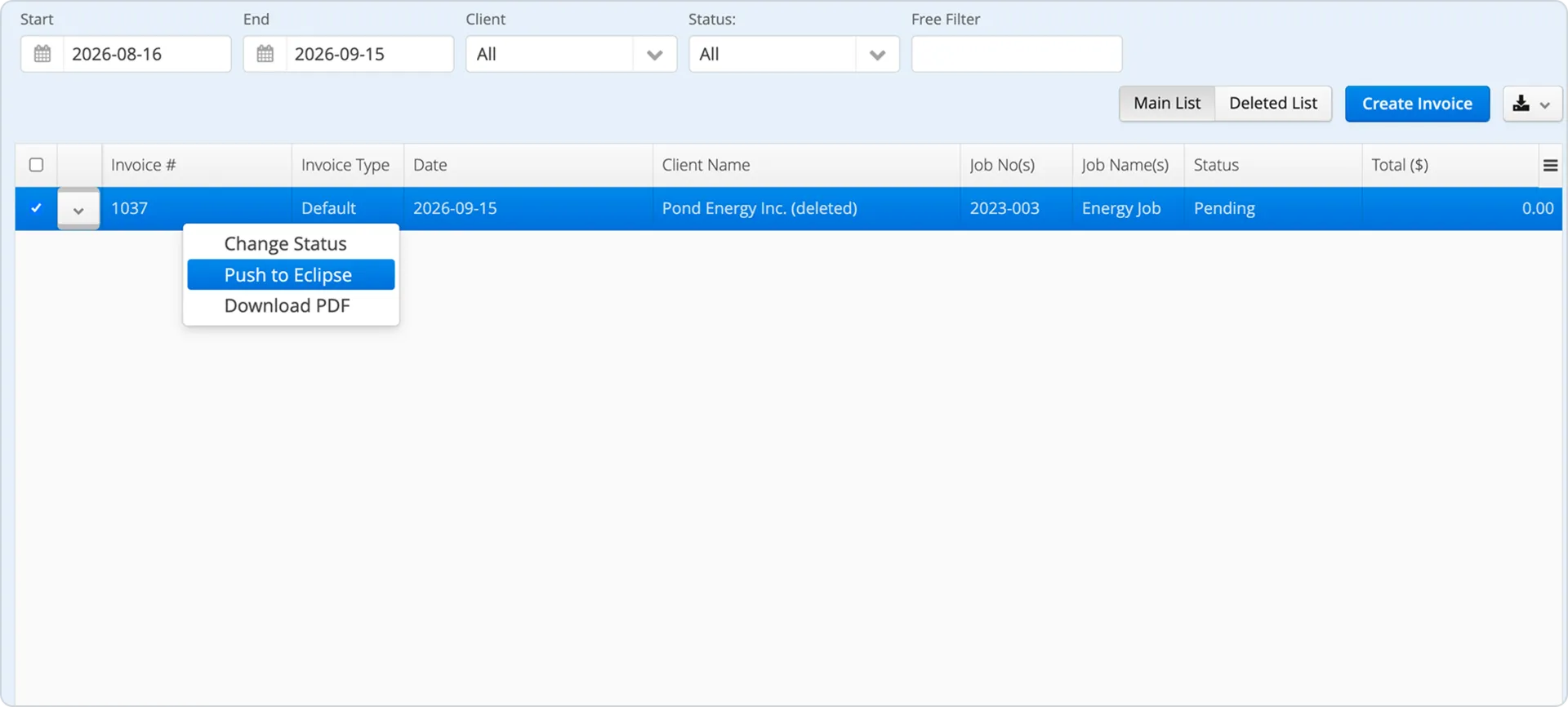
Exported to Eclipse: approved timecards to Eclipse Web Time Entry and the Hired Truck Register, with cost codes and hour breakdowns intact. Approved invoices to Eclipse with line items, cost codes, tax values, holdback amounts, and the invoice PDF.
The whole route is short:
Eclipse master data → Aimsio field capture → approvals → timecards and invoices back to Eclipse.
If you want the field-by-field mapping, including how employee and subcontractor hours split between Payroll and Hired Truck, the technical integration guide lays it all out.
What the Manual Handoff into Eclipse Really Costs You
Getting field work into Eclipse takes more steps than it should.
Take your LEMs, for example. A supervisor fills out a spreadsheet, then someone has to turn it into an invoice. Before it can be costed, the hours have to be entered into the right Eclipse module, and there’s more than one. Direct employees go to Web Time Entry. Subcontractors go to Hired Truck. Those are two separate modules, each configured its own way. And in Hired Truck, each owner/operator is its own record. Someone in the office sorts every line to the right place and keys it in.
And that’s if you use LEMs at all. Maybe you track the work in Microsoft Project instead. That gives you a schedule. It doesn’t give you a clean read on cost and margin per job, so you’re still exporting, reformatting, and reconciling to answer a basic question: did we make money on this one?
The coding runs underneath all of it. Every hour has to land on the right cost code, the same code your PMs use in Eclipse. Recorded one way in a spreadsheet and re-entered another way in Eclipse, each pass is a chance to attach the wrong code. The rates make it worse, because the rate you bill the client, the rate you cost the job at, and the rate you pay the crew are three different numbers from three different places. Miss the split and your job costing quietly understates what the labour actually cost.
Aimsio’s integration takes all that manual work out of the equation. Cost codes import from Eclipse into Aimsio, so crews capture against the same codes from the start. Aimsio bills from your price book and tracks cost with overtime and double time included, so margin is visible while the job runs, not months later. Approved hours route to the right Eclipse module in one click without anyone sorting or re-keying them.
That’s the shift, and it’s bigger than speed. When the field feeds Eclipse directly, you get two things at once: revenue certainty, because the invoice goes out clean and fast, and margin certainty, because you know what the job actually cost while you can still do something about it.
Aimsio’s WBS Report tracks metrics like Estimate at Completion (EAC) and Cost Performance Index (CPI) as the job runs. That question from earlier, did we make money on this one, turns into a number you can read today.
How Does the Explorer Eclipse Integration Connect Through Uplink?
The connection runs through Uplink, Explorer’s integration tool, and Aimsio’s onboarding team does the configuration. Five steps:
-
Connect through Uplink. Aimsio’s onboarding team sets up the Uplink connection to your Eclipse environment.
-
Import your Eclipse master data. Jobs, cost codes, employees, hired trucks, equipment, vendors, and vendor invoices arrive in Aimsio with your existing structure intact.
-
Capture field work in Aimsio. Crews record timesheets and tickets against the jobs and cost codes that came from Eclipse.
-
Push timecards back. Employee hours export to Web Time Entry and subcontractor hours export to the Hired Truck Register with the right cost codes and breakdowns.
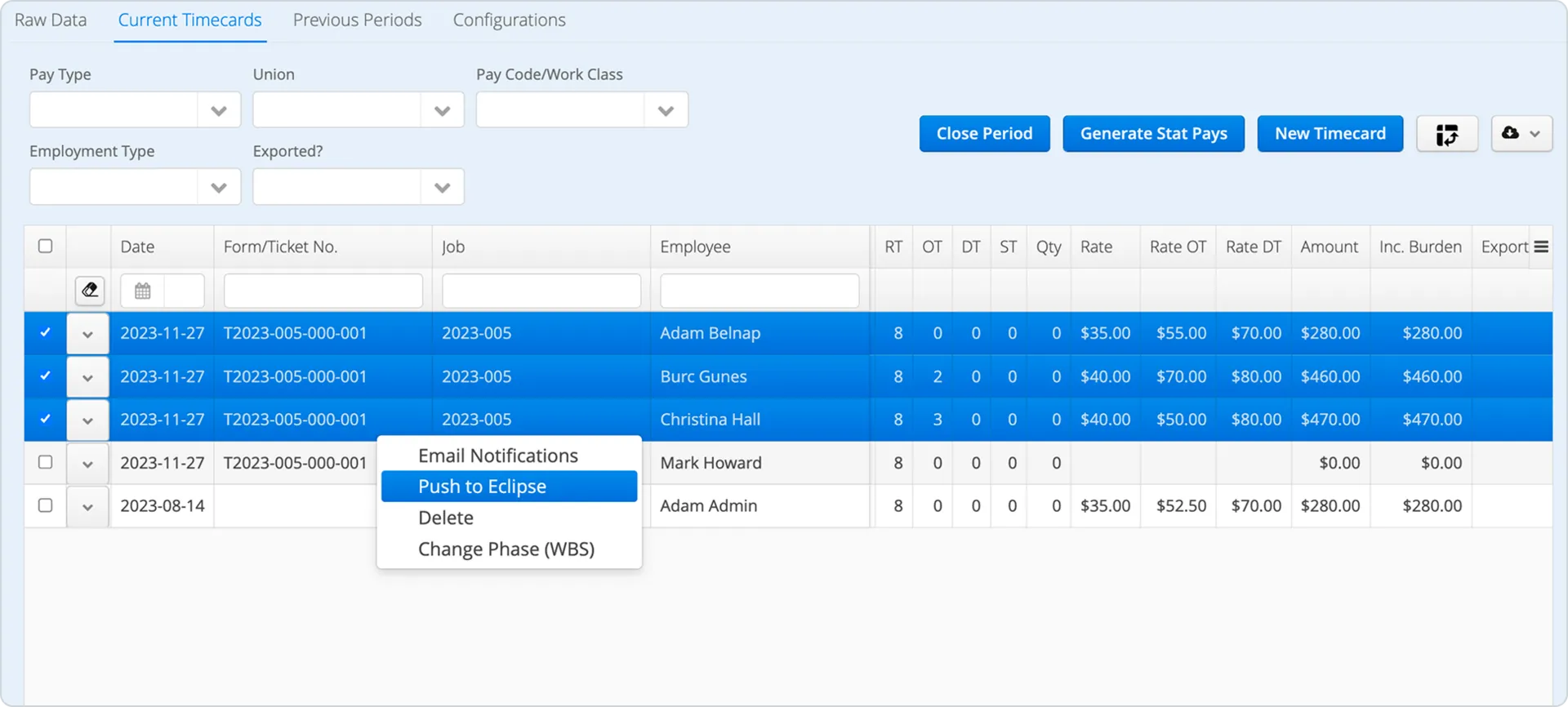
- Push invoices back. Approved invoices export with line items, cost codes, tax values, holdback amounts, and the PDF.
It’s configured once during onboarding. After that, the data moves without a keyboard in the middle.
Aimsio is listed as a Compatible partner in Explorer’s ecosystem, which means Explorer has reviewed the integration and considers it a good fit for Eclipse customers.
Which Contractors Should Use Aimsio with Explorer Eclipse?
This integration pays off for Eclipse users who feel the field-to-finance gap every week. Usually that’s construction and oilfield contractors with crews spread across remote sites, high ticket volume, and a billing process that still leans on someone re-typing field data into the ERP.
Financial complexity and field complexity aren’t the same problem. Eclipse handles the first problem, but being a strong ERP doesn’t fix the second. Crews still capture in spreadsheets or across disconnected apps, while someone in the office still stitches it together by hand. Invoices sit waiting on approvals that should have cleared days ago.
If your Eclipse data is clean but always a step behind the work, that step is what this integration removes. If your volume is low and your crews are small, the manual path might hold for now. But the wider the gap between where work happens and where it gets billed, the more this integration earns its place.
What Does a Connected Week Look Like?
Monday, a foreman closes a ticket on a lease site. They pick the job and cost code from a list that came straight out of Eclipse, so nothing needs translating later. Hours, hired-truck time, and materials all land on the right code the first time.
By midweek those tickets have cleared approval in Aimsio. Operations reviews them, and where the contract calls for it, the client signs off digitally. No calls to a foreman to confirm a number.
When finance builds the invoice, the billing rules are already set. It goes to Eclipse with line items, cost codes, tax, and holdbacks in place, plus the PDF, and lands in AR ready to post. The number that reaches your books is the number the field reported.
What’s gone is the middle. No re-keying, no reconciliation pile, no invoice sitting a week behind work that finished days ago.
The platform numbers give a sense of the scale. Aimsio has handled 6.5M+ field tickets and $13B+ in invoices, with 99% of digital approvals clearing (59% inside 24 hours, 81% inside five days). Those are platform-wide, not Eclipse-specific, but they’re what a closed field-to-finance gap looks like in practice.
See This at Explorer ELEVATE 2026
If you’re an Eclipse user weighing how to connect your field operations to your ERP, there’s a session worth catching at the Explorer ELEVATE conference in Naples, Florida, September 28 through 30.
Aimsio’s Abbas Sarraf (CPO and Co-founder) and Dennis Hale (VP of Sales) are running a breakout session on Tuesday, September 29th at 10:45 AM in Room Pine ABC: “The Invisible Tax: Where Contractor Revenue Leaks Between the Field and the Invoice, and How to Close the Gap.”
The session gets into where 2 to 7% of revenue tends to leak (missed charges, delayed approvals, and manual rework, quantified), what those leaks cost at scale based on real benchmarks, and how top contractors close the gap by capturing work in the field, flowing it to their ERP, and billing in days instead of weeks.
If you run field work on Eclipse, it maps directly to the workflow behind this integration. Learn more about ELEVATE.
See What This Looks Like in Your Eclipse Setup
If your Eclipse data is always a few days behind the field, the fix isn’t a bigger ERP or another hire re-keying tickets. It’s closing the handoff between the two.
Book a 30-minute demo and Aimsio’s team will walk through:
- Where your current field-to-Eclipse process is losing hours and revenue
- How crews capture work against your Eclipse cost codes from the first ticket
- The approval path from field ticket to client sign-off
- How approved timecards and invoices push back into Eclipse, holdbacks and PDF intact
- What setup looks like for your specific Eclipse configuration
Talk to someone who knows field ops →
Frequently Asked Questions
Does Aimsio replace Explorer Eclipse?
No. Eclipse stays your system of record and financial hub: payroll, AR, job costing, reporting. Aimsio is the field-execution layer that feeds it, so coded, approved data flows into Eclipse without manual re-entry. For how field service management software and ERPs divide the work, see our ERP vs. FSM comparison.
What data imports from Eclipse into Aimsio?
Jobs, cost codes, employees, hired trucks, equipment, vendors, and vendor invoices, so field and finance teams work from the same records.
What does Aimsio push back to Eclipse?
Approved timecards go to Eclipse Web Time Entry and the Hired Truck Register with cost codes and hour breakdowns. Approved invoices go to Eclipse with line items, cost codes, tax values, holdback amounts, and the invoice PDF.
How does the connection work?
Through Uplink, Explorer's integration tool. Aimsio's onboarding team handles configuration during setup.
Do crews need cell service to capture work?
No. Aimsio's field app captures offline and syncs when a connection returns, so remote sites and dead zones aren't a blocker. This is a general Aimsio capability, not specific to the Eclipse connection.
Does the integration handle holdbacks and tax?
Yes. Invoices export to Eclipse with tax values and holdback amounts included, along with the PDF. For the finer points of how holdback and tax map on the Eclipse side, your onboarding team works through it during configuration.