If you run field operations and your accounting team lives in QuickBooks Online, you’ve probably felt the friction. Work gets done. Data gets written down, or typed somewhere, or texted to the office. Then someone has to get that data into QuickBooks before an invoice can go out.
That gap between field execution and financial record is where billing delays live. It’s where data entry errors creep in. And it’s where cash flow slows down for no good reason other than the fact that your field management system and your accounting software don’t talk to each other.
Field service management software is built to close that gap. It captures work data at the job site, routes it through approvals, converts it to invoices, and pushes those invoices directly into your accounting system. No re-entry. No reconciliation calls. No three-week billing cycle for work that was finished on a Tuesday.
This post breaks down exactly how that connection works between Aimsio and QuickBooks Online, what it replaces, and what your team actually has to do to set it up.
What Is Field Service Management Software, and How Does It Fit with QuickBooks Online?
QuickBooks Online is accounting software. It’s excellent at what it does: tracking receivables, managing payables, reconciling accounts, and producing financial reports. But it wasn’t built for job-site data capture, crew dispatch, field ticket approvals, or work documentation in areas with limited connectivity.
Field service management software handles the execution layer. It’s where work gets assigned, tracked, documented, and approved before it ever becomes a financial record. Think of it as the system that produces the data QuickBooks needs, without requiring a human to manually transfer it.
When the two systems are integrated, the workflow runs without a handoff gap. Field crews capture work data. Approvals happen digitally. Invoices are generated. Then those invoices push directly into QuickBooks, where your accounting team works with them like any other record.
Aimsio is a field service management platform built for industrial and commercial companies, including oil and gas operators, construction firms, and utilities. It digitizes field operations, automates billing workflows, and connects field crews with back-office teams in real time. The QuickBooks Online integration is how that data crosses from the field into your books.
Aimsio vs. QuickBooks Online: Are They Competing or Complementary?
This is the question worth addressing directly, because it comes up often.
Aimsio and QuickBooks Online are not competing products. They serve different parts of your operation. QuickBooks manages your finances. Aimsio manages your field execution. The integration is what lets them work as one system instead of two disconnected ones.
| Category | QuickBooks Online | Aimsio FSM Software |
|---|---|---|
| Primary users | CFO, controllers, accountants, AR/AP | Field crews, dispatchers, ops managers, project managers |
| Core purpose | Financial transactions and reporting | Work capture and field execution |
| Operational model | System of record (retrospective) | System of execution (real-time) |
| Best use case | Recording and reporting financial data | Capturing and executing field work |
| Time to invoice | 5-12 days (manual entry from field data) | Same-day to next-day (automated from approved work) |
| Mobile experience | Accounting app, not built for field conditions | Native app, offline-capable for remote sites |
| Field adoption | Low (not purpose-built for crews) | High (designed for job-site use) |
| Dispatching and scheduling | Not included | Drag-and-drop system to schedule, notify, and verify crews |
| Digital field ticket capture | Not included | Completed on a tablet or phone and are connected to your workflows |
| Approval workflows | Not included | Documents are delivered and signed digitally so you get paid faster |
| Audit trail | Financial transactions | Field activities, ticket approvals, and job documentation |
| Reporting focus | Financial health | Operational performance and job-level cost visibility |
| Integration role | Import data such as customers, vendors, and employees into Aimsio. | Easily feed Job and Invoice data from Aimsio into QuickBooks. |
If you tried to run field operations out of QuickBooks, you’d be missing dispatch, crew tracking, field ticket capture, offline functionality, real-time approvals, and job-level cost visibility. QuickBooks wasn’t designed for any of that.
If you tried to run your accounting out of Aimsio, you’d be missing the general ledger, payroll, tax preparation, and the full suite of financial reporting your controller needs.
The right setup is both, connected. Aimsio handles the field. QuickBooks handles the books. The integration handles the transfer.
How Do You Connect Aimsio to QuickBooks Online?
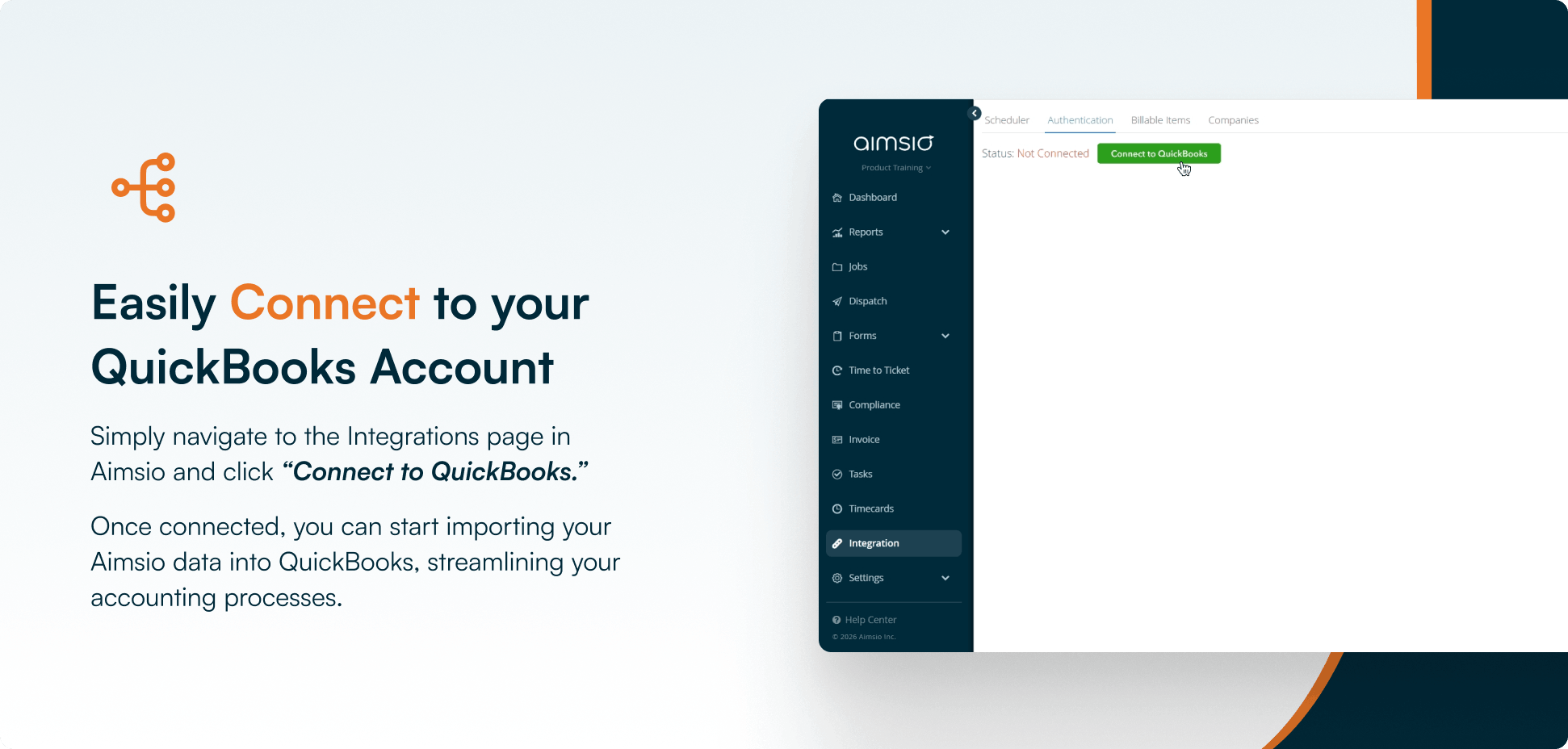
Setup is straightforward. Inside Aimsio, navigate to the integrations page and click “Connect to QuickBooks.” The authentication flow takes a few clicks, and once your accounts are linked, the integration is live.
There’s no IT project here. No custom development. No waiting on a consultant. Your controller or office manager can handle it.
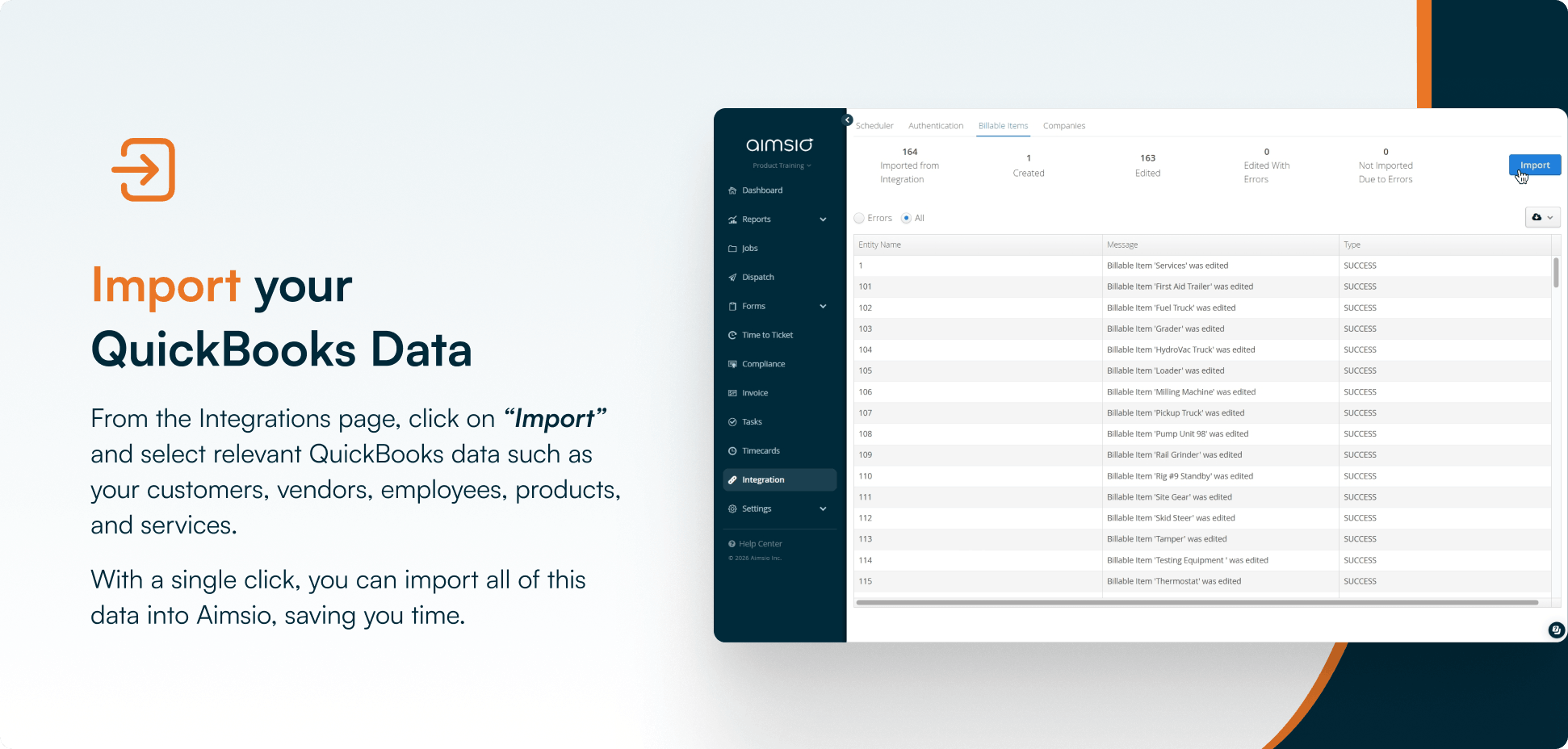
Billable Items. A clicker is pointed on the Import button on the top right. Image text reads: Import your QuickBooks Data. From the Integrations page, click on “import” and select relevant QuickBooks data such as your customers, vendors, employees, products and services.
Once connected, you can pull your existing QuickBooks data directly into Aimsio with a single click. Customers, vendors, employees, products, and services all import automatically. That means your Aimsio jobs and invoices are already tied to the right QuickBooks records from day one. No re-entering client names. No rebuilding your cost codes.
For more details about the setup, read our support article here.
What Happens to Your Invoices?
When your field crews complete work in Aimsio, that data flows through approvals and the office generates invoices inside the platform. When you’re ready to push those invoices to QuickBooks Online, you select them in bulk and click “Push to QuickBooks Online.”
Aimsio transfers the selected invoices automatically and confirms which ones have been successfully pushed. Your accounting team sees the invoices appear in QuickBooks, ready to send to clients or reconcile against payments received.
What this replaces: downloading a report from your field system, opening QuickBooks Online, manually entering each invoice line by line, then checking your work. For a company running dozens of jobs at once, that process can eat hours every billing cycle. With the integration, it’s a button.
What Does “No Double Data Entry” Actually Mean in Practice?
Double data entry is what happens when your field management system and your accounting system don’t share data. Someone captures work in the field. Someone else re-enters that work into QuickBooks. Two people, two data sets, twice the opportunity for error.
The Aimsio and QuickBooks Online integration eliminates the second entry entirely. Field data is captured once in Aimsio. It flows through approvals once. It gets pushed to QuickBooks once. Your accounting team sees the same numbers your field team produced, without touching a keyboard to get them there.
That’s not just a time saving. It’s an accuracy improvement. Every manual re-entry step is a place where numbers can drift: a wrong job number, a mis-categorized cost, a missing line item. When data moves automatically from source to destination, those drift points disappear.
Before vs. After Integration
| Task | Without Integration | With Aimsio + QuickBooks Online Integration |
|---|---|---|
| Importing client/vendor data | Manual entry into both systems | One-click import from QuickBooks into Aimsio |
| Pushing invoices to QuickBooks | Manual re-entry, line by line | Bulk push with one click |
| Confirming invoice transfer | Follow up manually, check both systems | Aimsio confirms successful push automatically |
| Billing cycle time | Days to weeks after work completion | Same day or next day after approval |
| Risk of data entry errors | High, every re-entry is a risk | Minimal, data moves from source once |
When we figured out we could leave the data in QuickBooks and leave Aimsio’s data where it is and then use Power BI as an outside program to aggregate all that data, that really became the turning point for us. Now we have a report that brings all the data together, captures it, it’s real-time and we can filter it in any way we want
Why Does Billing Cycle Time Matter More Than You Think?
Aimsio has processed more than $11 billion in invoices through its platform. The companies contributing to that number didn’t get there by adding people to the billing process. They got there by removing steps.
When field data flows directly into QuickBooks, invoices can go out the same day work is completed and approved. For a company carrying significant work-in-progress at any given time, that’s not a workflow improvement. It’s a cash flow improvement.
If your billing cycle runs two or three weeks behind field completion, consider what that means for your receivables. Work is done. The client owes you money. But the clock hasn’t started on collection because the invoice hasn’t left your office. Compressing that gap is worth real dollars, not just saved hours.
What Can You See in QuickBooks After Pushing from Aimsio?
Once your Aimsio jobs and invoices are pushed to QuickBooks, they appear as standard records in your QuickBooks account. Your accounting team can track them, apply payments, run reports, and manage them exactly as they would any other QuickBooks invoice.
There’s no “Aimsio view” to navigate to. No separate dashboard to learn. Your financial data lands in QuickBooks and behaves like QuickBooks data, because at that point, it is.
What Should Field Service Companies Look for in a QuickBooks Online Integration?
Not all integrations are built the same. Before adopting any field service software that claims QuickBooks compatibility, it’s worth asking a few specific questions.
Does it do two-way data sync, or one-way push only? Can you import your existing QuickBooks customers and vendors into the field system, or do you have to re-enter them? Can you push invoices in bulk, or only one at a time? Does the system confirm which transfers were successful, or do you have to check QuickBooks manually to find out?
The Aimsio integration covers all of these: bulk invoice pushing, one-click import of QuickBooks records into Aimsio, and automatic confirmation of successful transfers. Your existing QuickBooks data comes with you from day one.
What Changes When You Close the Loop Between Field and Finance
Right now, if your accounting team asks what work has been completed but not yet invoiced, the answer probably requires someone to check two or three places and make a phone call. That’s not a visibility problem. It’s a structural one.
When Aimsio and QuickBooks Online are connected, approved field work becomes an invoice, and that invoice lands in QuickBooks. The gap between work completed and revenue recognized shrinks to hours instead of weeks. Your financial team has accurate data to work with. Your operations team stops getting calls asking when the paperwork is coming.
Both teams stay in their lanes, because the data moves on its own.
If you want to see how the integration works for your specific workflows, connect with someone on our team.
Frequently Asked Question
Is Aimsio listed on the QuickBooks App Marketplace?
Yes. Aimsio is available on the QuickBooks App Marketplace, which means it has met Intuit’s requirements for integration compatibility with QuickBooks Online.
Does the integration work with QuickBooks Desktop, or only QuickBooks Online?
The integration described here is specifically for QuickBooks Online. For questions about QuickBooks Desktop compatibility, please contact the Aimsio team directly.
What QuickBooks Online data can I bring into Aimsio?
With a single click after connecting your accounts, you can import customers, vendors, employees, products, and services from QuickBooks Online into Aimsio. That data populates your jobs so naming and coding stays consistent between both systems.
Can I push invoices to QuickBooks Online one at a time, or only in bulk?
The integration supports bulk pushing. You select the invoices you want to transfer and click “Push to QuickBooks Online.” Aimsio confirms which invoices were successfully pushed.
Do I need IT help to set up the integration?
No. The connection process lives inside Aimsio’s integrations page and takes a few clicks to authenticate your QuickBooks account. No custom development or technical resources required.
How does this integration affect billing cycle time?
By eliminating manual re-entry between field data capture and QuickBooks, invoices can be pushed to your accounting system the same day work is approved in Aimsio. That compresses the time between job completion and invoice delivery significantly.
Is Aimsio a replacement for QuickBooks Online?
No. Aimsio and QuickBooks Online serve different functions. Aimsio manages field execution: job creation, crew dispatch, field ticket capture, approvals, and invoicing. QuickBooks manages your finances: general ledger, receivables, payables, and reporting. The integration connects them so data moves between the two without manual effort.