Ticket Rate Visibility for Aimsio Lite
Control who sees rates and when. Field crews capture the work without seeing pricing, your office sees everything, and clients see rates when it matters most — on the invoice.
Not everyone should see rates on a ticket. Your field crew needs to capture hours, equipment, and materials, but they do not need to see what you are charging for them. And you may not want your client seeing rates until the invoice, when the billing conversation happens on your terms.
Field crews see the work. Your office sees the rates.
Ticket Rate Visibility gives you role-based control: field crews create and submit tickets without ever seeing your rates, while your office keeps full visibility to review before anything is invoiced.
It works in two layers: what happens on screen, and what happens on the PDF.
On screen (the ticket form)
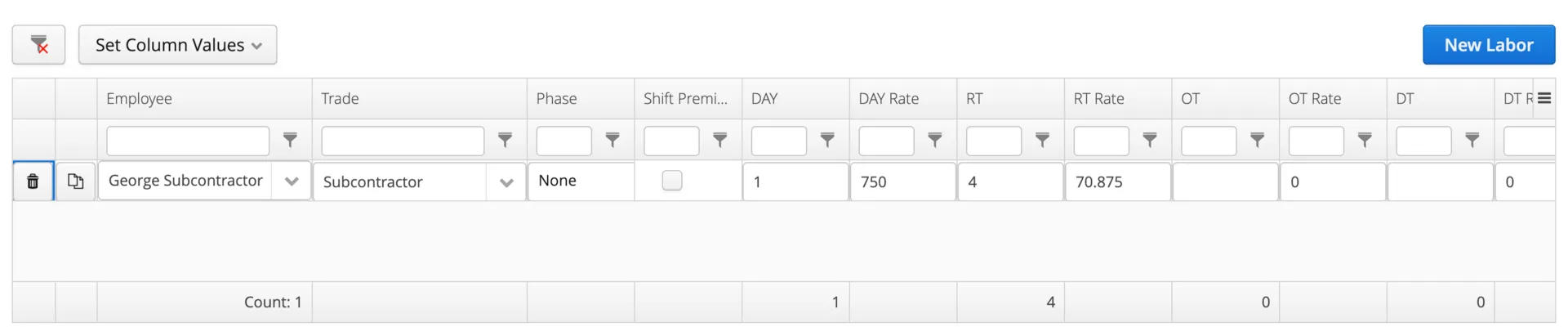
Rates can be shown or hidden by role. Field workers see only the quantities they need to capture — hours, equipment, materials. Office users and supervisors see the full picture, including rates pulled from your price book, so they can catch any pricing issues before creating an invoice.

On the PDF (the generated document)
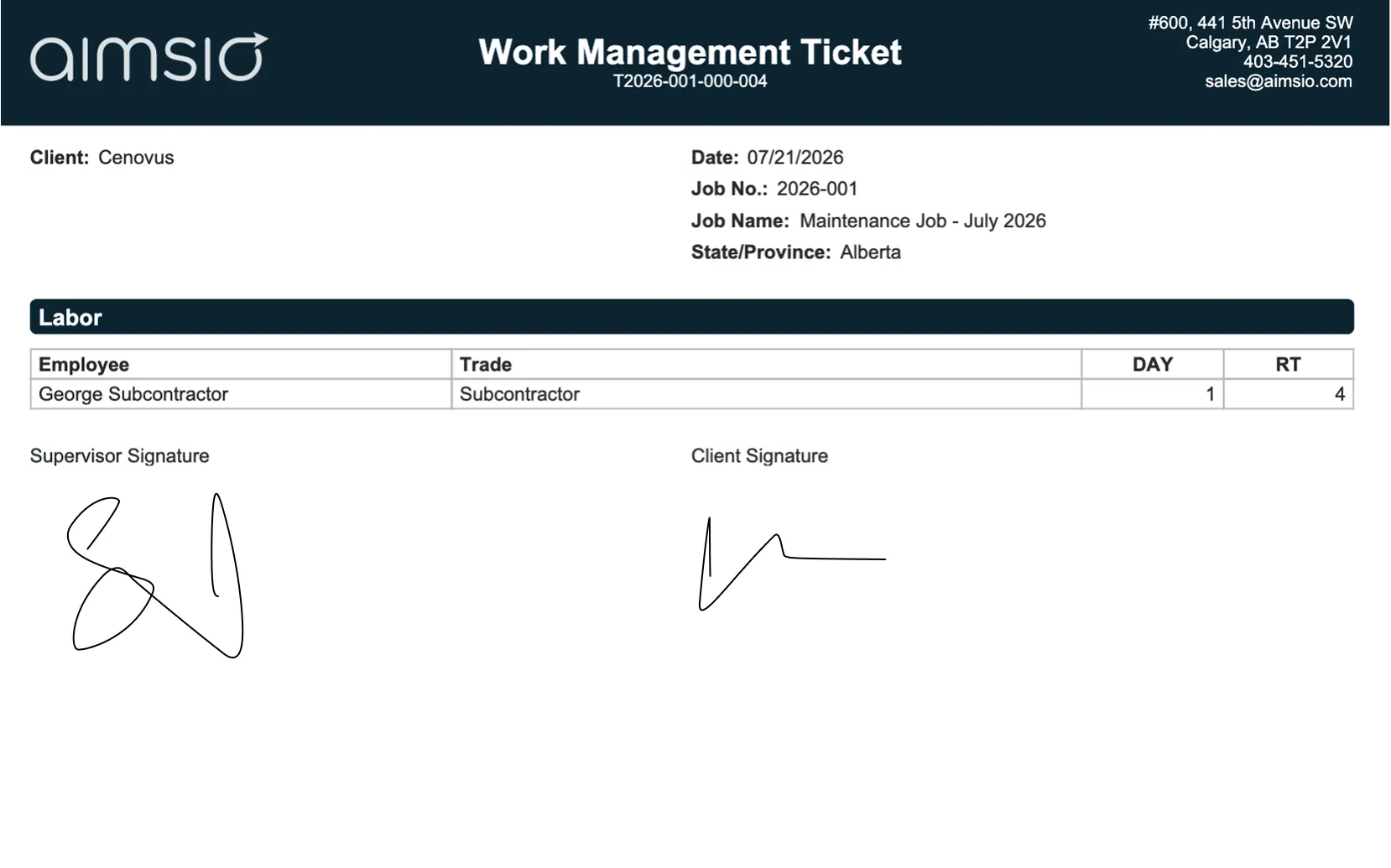
The ticket PDF is a single fixed layout. It looks the same to everyone who opens it. In Aimsio Lite, that means rates and totals are hidden on the ticket PDF for all viewers — so a field crew or a client opening the PDF sees quantities, not pricing. Rates appear to your client for the first time on the invoice.
Built for speed and simplicity
Ticket Rate Visibility on Aimsio Lite is a strong fit when you want a simple, cost-effective path from ticket capture to invoicing and you do not need rates on the ticket PDF itself. Two workflows work especially well:
Quantity-only sign-off
Your client signs the ticket to confirm the quantities of work — hours, equipment, materials — without rates on the page. Rates first appear on the invoice. Fast, focused, and clean.
Invoice-first billing
Your client does not sign tickets at all. Tickets are internal records, and the first document your client sees with rates and totals is the invoice — giving you full control over the billing conversation.
If either of those describes how you bill, Ticket Rate Visibility on Lite fits your operation.
When Essentials is the better fit
On Lite, you work from the ticket alone. Aimsio Essentials and above adds Timesheets, which separate what your crew records in the field from what you bill. That separation unlocks the situations below. Consider Essentials if:
-
Your client needs to sign a ticket that shows rates and totals. Essentials moves the field record onto a separate Timesheet. The crew fills out that Timesheet, which has no rates. The ticket, handled in the office, is what carries the rates for your client to sign.
-
Multiple crews or shifts need to combine into one ticket per job per day. With Timesheets, each crew records their hours independently, and the office combines them into a single ticket. This is possible with Essentials and above.
If any of these describe your billing, Aimsio Essentials is worth a look. Your point of contact can walk you through the difference.
Part of a bigger workflow
Frequently Asked Questions
Not on Aimsio Lite. The ticket PDF is a single fixed layout, so it looks the same to everyone who opens it. On Lite, rates and totals are hidden on the ticket PDF for all viewers, and rates appear to your client on the invoice. If you need a ticket PDF that shows rates for client signature, that is available on Essentials.
No. Field crews can be set up to see only the quantities they need to capture: hours, equipment, and materials, all without rates or totals. Your office team and supervisors keep full rate visibility for review.
On the invoice. With Ticket Rate Visibility on Lite, the invoice is the first client-facing document that shows rates and totals, which gives you control over the billing conversation.
Yes, and this is why we recommend keeping rates visible for office users rather than hiding them from everyone. When a ticket comes in from the field, your office team can see the rates pulled from your price book, catch any changes or errors, adjust if needed, and then create the invoice.
The best time to raise this is before you go live, so your roles and rate visibility are configured to match how your team works from day one. If you are already live on Aimsio, talk to your point of contact about adjusting your setup.
That is a common reason to move to Essentials. Essentials separates field data from billing, so you can send a rate-bearing ticket to your client for signature while keeping payroll hours separate. Raise it during your demo and we will confirm which tier fits your billing.