Shift-Based Billing
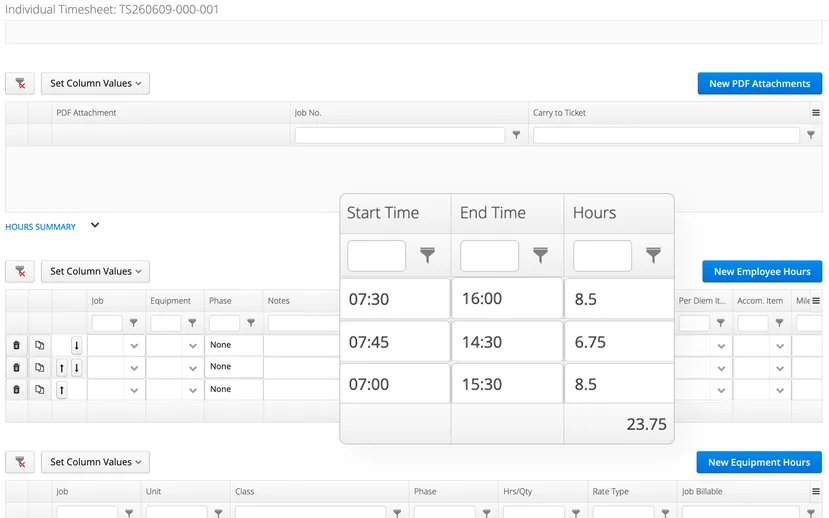
For operations that bill by shift rather than total hours, Aimsio can be configured to capture start and end times on timesheets and calculate hours automatically.
Most timesheet entry captures total hours worked. For operations running defined shifts, that means crew members are calculating their own hours and entering a number. Start and end times go unrecorded, and shift duration errors only surface when billing disputes arise.
Enter the time. Aimsio handles the rest.
When Shift-Based Billing is configured for your account, crew members enter a start time and end time directly on their timesheet instead of a total hour figure.
Aimsio calculates the hours from the difference automatically. The rest of the timesheet workflow such as job codes, cost codes, and approvals all stay the same.
Built for shift-based operations
- Operations that run defined shifts and bill clients by shift duration
- Supervisors who want to capture exact start and finish times rather than relying on crew members to calculate their own hours
- Companies whose payroll uses automated overtime rules rather than manual RT/OT/DT entry
Part of a bigger workflow
Frequently Asked Questions
Yes. Shift-Based Billing works when Aimsio's automated overtime rules handle the RT/OT/DT breakdown at the job level. If your operation manually enters regular time, overtime, and double time as separate fields, this configuration is not compatible with your setup. Raise it during your demo and we will confirm whether it fits.
The best time to raise this is before you go live. Setting it up during onboarding means your team has it from day one and your workflows are built around it from the start. If you are already live on Aimsio, talk to your point of contact and we can assess whether it can be added to your account.
Yes. The configuration applies to both Crew Timesheets and Individual Timesheets.
Shift-Based Billing requires Aimsio's automated overtime rules to calculate the hour breakdown. If your crews currently enter regular time, overtime, and double time as separate fields on their timesheets, this configuration is not compatible. Raise it during your demo and we will confirm which setup fits your operation.
Travel hours need to be handled separately for Shift-Based Billing to work cleanly. If your timesheets include a travel hours column, mention it during your demo so the onboarding team can configure it correctly.